 Database Properties
When you select a database in Stonefield Query Studio, the properties pane displays the properties for that database. In addition to properties you can change, this pane also shows the number of tables and fields in the database.
A class in an object-oriented language serves as a template: it defines a certain interface and behavior. The object created when you instantiate the class can be thought of as the physical implementation of the class.
Stonefield Query treats databases in a similar manner. A logical database is similar to a class: it defines what tables belong to the database and the structure of those tables. This is what Stonefield Query refers to as a "database." A physical database is the actual database on disk; Stonefield Query refers to this as a "data source." The logical database doesn't concern itself with location or type of access; those are issues for the physical database. For example, you may have both SQL Server and Microsoft Access versions of the same logical database; the Northwind sample database that comes with both of these is one such set of physical databases that have the same logical database structure.
Stonefield Query uses the concept of a "main" database for an application. The main database is the one that the user can change data sources for. All other databases are assumed to be related to the main one in that selecting the data source for the main one somehow determines how the data source for the others is selected.
For example, imagine an accounting application that has two databases: a system database that contains application-specific data, and a company-specific database containing the accounting information for the company. The user may have different databases for different companies, so they can change data sources to select the appropriate database for the desired company. However, there is only one system database. In this case, the company-specific database is considered to be the main one, since that's the one the user can select different data sources for.
Here's another example: an application that has multiple instances of two databases (such as for production and test data) on different servers. When the user chooses a data source for one of those databases, Stonefield Query uses the other database from the same server as the first one. Thus, either database can be the main database, and an OpenDataSource script for the second database can set the properties for the second database to match those of the selected data source for the main database.
The properties displayed are:
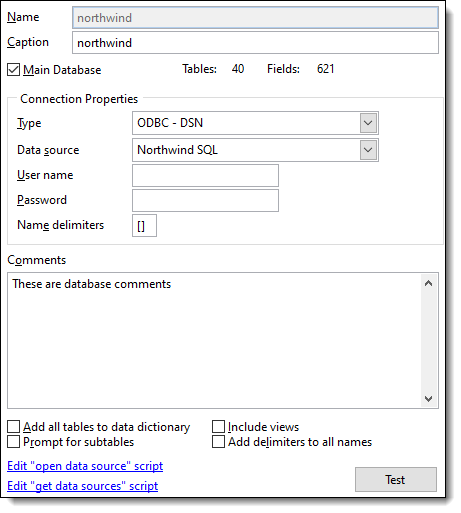
Name: the name of the database. Note that this is the logical name of the database, not the physical name. You cannot edit the name.
Caption: the descriptive name of the database. This name is shown in the Stonefield Query status bar if only one data source is available.
Main Database: turn this option on for the main database in the data dictionary. If only one database is used, it is automatically the main one.
Type: the type of connection to use when the data dictionary is refreshed. The choices are the same as those when you add a database to the data dictionary: ODBC - DSN, ODBC - Connection String, OLE DB, Visual FoxPro - Database Container, Visual FoxPro - Free Tables, or None.
Data source: this item, which only appears when Type is set to ODBC - DSN, allows you to choose the data source to refresh the data dictionary against.
User name: this item, which only appears when Type is set to ODBC - DSN, allows you to specify the user name for the data source to refresh the data dictionary against.
Password: this item, which only appears when Type is set to ODBC - DSN, allows you to specify the password for the data source to refresh the data dictionary against.
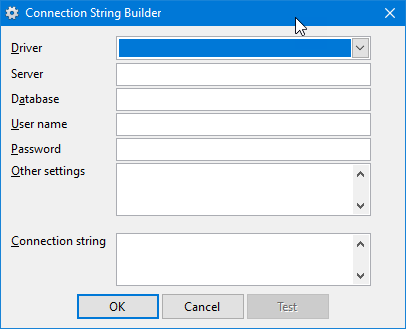
Connection string: this item, which only appears when Type is set to ODBC - Connection String or OLE DB, allows you to specify the connection string for the data source to refresh the data dictionary against. You can also click the Build button to display the Connection String Builder (for ODBC) or Data Link Properties dialog (for OLE DB) to help visually build the connection string.
Database location: this item, which only appears when Type is set to Visual FoxPro - Database Container, allows you to select the database to refresh the data dictionary against.
Free table directory: this item, which only appears when Type is set to Visual FoxPro - Free Tables, allows you to specify the location of the free tables to refresh the data dictionary against.
Name delimiters: this item, which isn't available for Visual FoxPro databases, specifies which characters to use as delimiters around table and field names that need delimiters (for example, names with spaces in them). Specify a two-character value, with the first character being the left delimiter and the second being the right. Examples are "", meaning use double quotes, and [], meaning names are delimited with square brackets. MySQL needs the reverse apostrophe: ``.
Comments: comments about the database. These comments aren't used anywhere but are output when you use the Export to Excel function.
Add all tables to data dictionary: turn this option on if you want all tables automatically added to the data dictionary or turn it off if you want to select which tables to add when you refresh the data dictionary.
Include views: turn this option on if you want views included when you refresh the data dictionary.
Prompt for subtables: this option allows you to indicate whether you are prompted for subtable names when multiple relationships are found between tables or a table has a self-join. While this is turned on by default, you may wish to turn it off if you don't plan on dealing with multiple relations and don't want to be prompted for them every time you refresh the data dictionary.
Add delimiters to all names: turning this option on tells Stonefield Query Studio to add delimiters (such as [ and ]) to all names when the data structures are read from a database.
Test: click this button to test the connection settings for the database.
The Create "open data source" script link is used to create an OpenDataSource script for the database. This script is called when the user opens a data source. Typically, the main database won't have an OpenDataSource script, since Stonefield Query handles that automatically. The other databases, however, need such a script to tell Stonefield Query what to do. This link appears as Edit "open data source" script if the script already exists; click it to jump to that script.
The Create "get data sources" script link is used to create a GetDataSources script for the database. This script is used to define which data sources are available for this database. This link appears as Edit "get data sources" script if the script already exists; click it to jump to that script.
© Stonefield Software Inc., 2026 • Updated: 04/14/21
Comment or report problem with topic