 Table Properties
There are three types of tables in Stonefield Query:
Real tables physically exist in the database. They are shown as
 in the TreeView.
Virtual tables are those that you define and don't physically exist. When the user uses a virtual table in a report, script code you create is used to retrieve the appropriate data. Virtual tables, shown as
 in the TreeView, are typically used to hide the complexity of an application's data structures.
Subtables, which appear as
 in the TreeView, are used to resolve self-joins or multiple relationships between tables.
When you select a table in the Stonefield Query Studio, the properties pane displays the properties for that table. The properties displayed are:
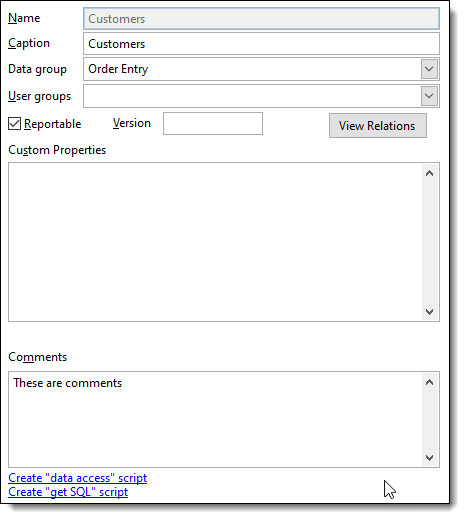
Name: the name of the table. If the name contains characters other than letters, numbers, and underscores, or if it matches a SQL keyword, such as DESC or ORDER, Stonefield Query Studio automatically adds delimiters around the name (the delimiters you specified when you added the database to the data dictionary). You can also manually add delimiters if necessary. Name delimiters aren't shown when you edit a table. The name can be up to 64 characters long. This control is normally disabled for real tables and enabled only for virtual tables and subtables. However, you can edit the Name of a real table by double-clicking the Name label. This should only be used rarely.
Caption: the name as displayed to the user in Stonefield Query. If the caption is an expression that should be evaluated, precede it with an equals sign ("="). For example, if the caption calls the GetCaption user-defined script, specify "=GetCaption()" (without the quotes) for the caption. Note the expression is evaluated every time the table is accessed, so you get better performance by changing the caption in the DataEngine.GetCustomMetaData event script instead.
Data group: the data group or groups the table belongs to (see the Creating a Data Group topic for information on data groups). "Data group" is replaced with the descriptive name you specify in the Description for data groups configuration setting. This option is disabled if you haven't defined any data groups in Stonefield Query Studio. To change the data group for the table, click the drop-down button to display a TreeView of the defined data groups and turn on or off the checkmarks in front of the appropriate data group names. Click the drop-down button again to close the list.
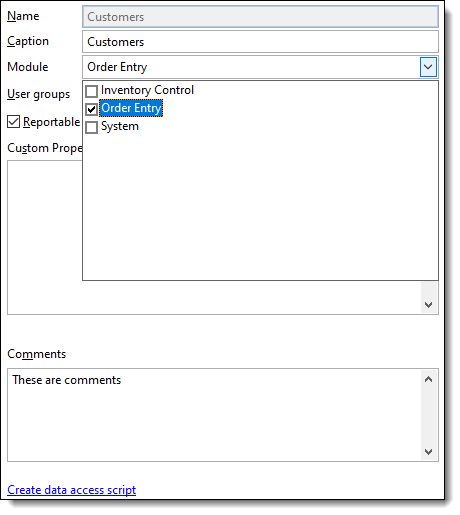
User groups: the user groups that can access the table (see the Creating a User Group topic for information on user groups). Leave this property blank to allow all users to access it. To change the user groups that can access the table, click the drop-down button to display a TreeView of the defined user groups and turn on or off the checkmarks in front of the appropriate user group names. Click the drop-down button again to close the list.
Reportable: if this property is turned on (which it is by default), the user can query on fields from this table. Turning this off makes all the fields unreportable and the table won't appear anywhere in Stonefield Query. This is handy for "system" tables or tables you don't want the user to ever query on.
Version: the table's version number. A blank value means the table is not versioned: it appears in Stonefield Query regardless of the version of the database. For a table that isn't available in every version of the database, enter the version number followed by "+" to indicate the table appears in that version and higher versions and should not appear in lower versions (that is, the table was added in that version), "-" to indicate the table appears in that version and lower versions and should not appear in higher versions (that is, the table was removed in the next version), or no suffix to indicate the table appears only in that version and should not appear in any other version. For example, "5.3+" indicates the table is available starting in version 5.3 while "5.3-" indicates it was removed in version 5.4.
Use a comma-delimited list of values if the table was added in one version and later removed. For example, "5.3+,5.5-" means it was added in version 5.3 and removed in version 5.6.
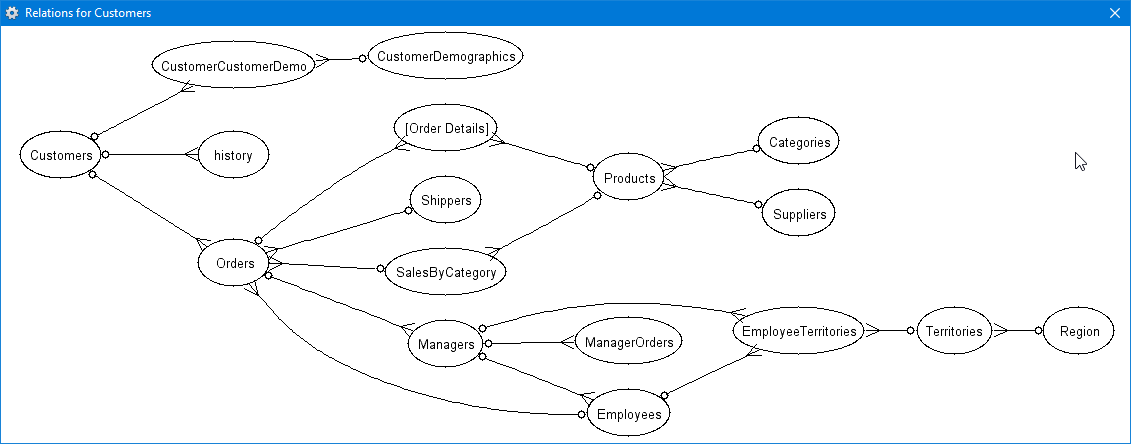
View Relations: click this button to display the relationships for this table and the tables related to it. You are asked how many levels to go down (1 to 10). Here's an example:
Custom Properties: Stonefield Query doesn't use this property for anything. You can use it to hold any information you wish. The value is stored in the UserDefined property of the Table object, which a user-defined script could use for any purpose necessary.
Comments: comments about the table. These comments aren't used anywhere but are output when you use the Export to Excel function.
The Create "get SQL" script link is used to create a GetSQL script for the table. This script is used if you don't want a simple SQL statement used to access the fields in the table. For example, a common use is to UNION two tables, such as current and archived invoices, into a single result set. This link appears as Edit "get SQL" script if the script already exists; click it to jump to that script.
The Create "data access" script link is used to create a Select script for the table. This script is used if you need to create the result set for the table using code. For example, if you want to call a stored procedure, create a data access script that calls the stored procedure. This link appears as Edit "data access" script if the script already exists; click it to jump to that script.
If a GetSQL script exists for the table, the Create "data access" script is disabled and vice versa, so only one of these can be created for a table.
© Stonefield Software Inc., 2023 • Updated: 04/14/21
Comment or report problem with topic