 Working with Stonefield Query Studio
Stonefield Query Studio consists of a menu, a toolbar, a Microsoft Outlook-like pane of panels, a properties pane, and a status bar.
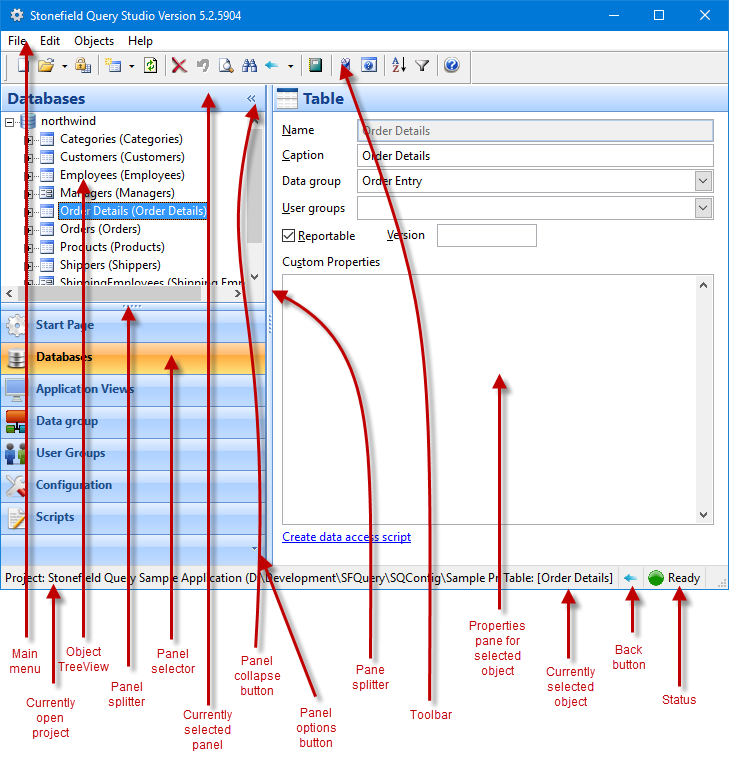
The menu and toolbar provide functions such as creating a new Stonefield Query project, adding databases to the data dictionary, and launching Stonefield Query to test a project. A shortcut menu is also available.
The panels control allows you to select a specific set of objects to work with, such as tables and fields in a database or scripts.
The properties pane shows the properties for the selected object.
The status bar shows the application name and location of the current Stonefield Query project (click to open a Windows Explorer window for the location), the currently selected object in the TreeView, a Back button which allows you to move back to previously selected objects similar to the Back button in a browser, and the status of certain operations, such as discovering metadata for a database.
There is no "save" button to save changes made in the properties pane. Studio automatically saves any changes unless you specifically click the Revert button in the toolbar.
You can resize Studio as desired. A splitter control between the panels control and the properties pane allows you to control the relative widths of these items.
You can pass a parameter to Stonefield Query Studio, telling it to automatically open a particular Stonefield Query project. To do so, add "project=" followed by the directory where the Stonefield Query project files are located to the command line.
© Stonefield Software Inc., 2026 • Updated: 08/29/18
Comment or report problem with topic