 Expression Builder
The Expression Builder is a dialog that helps you enter expressions without having to type table and field names. This dialog may be invoked by clicking the button with the ellipsis (...) beside a text box where an expression is normally typed. In addition to making it easier to enter expressions, the text box you type in is much larger in the Expression Builder and can be made even larger by resizing the dialog. To resize the Expression Builder window, click the lower right corner of the window and drag until the window is the desired size. Stonefield Query remembers the size and position of the Expression Builder and restores it the next time you run it.
The Expression Builder is available for the Output Expression, Fields Involved, and Values Method text boxes in the Calc page of the properties pane when a field is selected, and in the Main page of the properties pane when a script is selected.
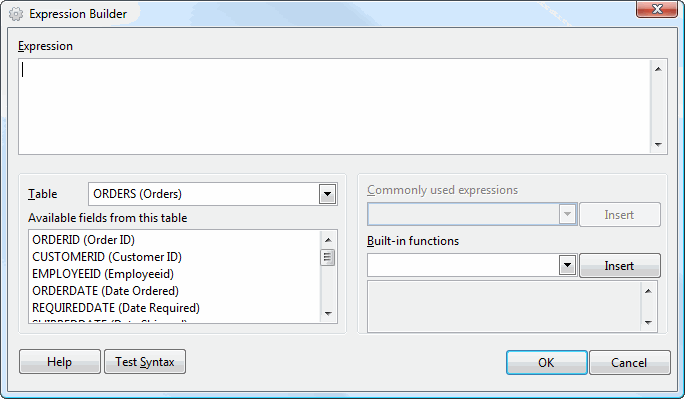
The Expression Builder has the following options:
Expression: the expression you wish to use. You can type any valid Visual FoxPro expression directly in the Expression text box or add fields or functions to it from the other controls in the dialog.
Table: a drop-down list that displays the names of the tables you can select fields from.
Available fields from table: a list containing all reportable fields from the table shown in the Table list. To add a field to the Expression text box, double-click the desired field or select it and press Enter. The field is added at the current cursor position in the Expression text box.
Commonly used expressions: a drop-down list of commonly used expressions. For example, the expression "date() - day(date()) + 1" evaluates to the first day of the current month, but this expression is difficult to remember and type properly. So, simply choose the expression from the list and click the Insert button to add the expression to the Expression text box.
Built-in functions: a list of the functions built into Stonefield Query. When you select a function in the list, the box below the list displays a description of the function and the parameters to pass to it. Select the desired function from the list and then click the Insert button to add it to the Expression text box. See the Function Reference topic for information on these functions.
Test Syntax: click this button to test whether the expression is valid. Note this only tests for the syntax of the expression, not whether it is completely valid. For example, an expression like "LEFT(SomeNumericField, 10)" is syntactically correct but isn't valid because the LEFT() function is for character fields, not numeric fields.
Once you have entered the desired function, click the OK button to save it or Cancel to cancel and close the dialog.
© Stonefield Software Inc., 2023 • Updated: 02/18/16
Comment or report problem with topic