 Relation Properties
When you select a relation in Stonefield Query Studio, the properties pane displays the properties for that relation.
Although SQL doesn't have the concept of one-to-many or child-parent relations, Stonefield Query has an easier time resolving the relationships required in a query if you specify which table is on the "many" side and which is on the "one" side of a relationship (or which is the parent and which is the child).
The properties displayed are:
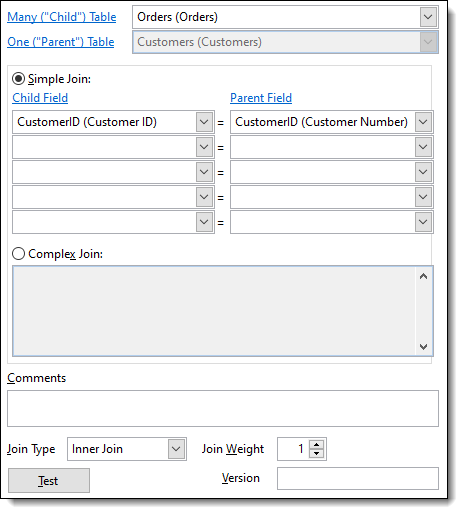
Many ("Child") Table: select which table is on the "many" side of the relationship from the drop-down list of tables. If this property contains the name of the selected table, it's disabled. Click the link to jump to the child table in the TreeView.
One ("Parent") Table: select which table is on the "one" side of the relationship from the drop-down list of tables. If this property contains the name of the selected table, it's disabled. Click the link to jump to the parent table in the TreeView.
Simple Join: select this option if the relationship is based on matching up to five fields in each table; that is, the JOIN clause in a SQL statement is something like CHILD.FIELD = PARENT.FIELD or a little more complex like CHILD.FIELD1 = PARENT.FIELD1 AND CHILD.FIELD2 = PARENT.FIELD2.
Child Field: select the field from the child table used in the relationship. Click the link to jump to the first child field in the TreeView.
Parent Field: select the field from the parent table used in the relationship. Note that when you select the child field, Stonefield Query Studio automatically selects any parent field with the same name, since it's likely that field is the linking field. Click the link to jump to the first parent field in the TreeView.
Complex Join: select this option for relationships that aren't based on matching fields or there are more than five fields involved. Enter the expression for the relationship. Field names should be fully aliased (that is, include the name of the table). If either the table or field name contains illegal SQL characters (such as spaces) or SQL keywords, place delimiters around the table or field name.
Note that if you have a very complex relationship that involves a third table, you have to use a little different syntax. Put an asterisk (*) on the first line of the expression to signal that this type of relationship is used, then on separate lines (that is, press Enter after each line) put each JOIN statement required. For example, suppose tables A and B are joined using table C:
  select SomeFields from A inner join C on A.Field1 = C.Field1
      inner join B on B.Field2 = C.Field2
Assuming A is the child table, the expression in Stonefield Query for the relationship between A and B should look like this:
  *
  inner join C on A.Field1 = C.Field1
  inner join B on B.Field2 = C.Field2
If B is the child table, use this instead:
* inner join C on B.Field2 = C.Field2 inner join A on A.Field1 = C.Field1Comments: comments about the relation. These comments aren't used anywhere but are output when you use the Export to Excel function.
Join Type: select which type of join to use: inner, left outer, right outer, or full. An inner join only selects those parent ("one") records with at least one matching child ("many") record. In Stonefield Query, the child ("many") table is always on the left side of a join, so a left outer join means that you want child records regardless of whether a parent record exists or not, and a right outer join (more common) means you want parent records whether a child record exists or not. A full join gives records from both tables regardless of whether there are matching records in either table.
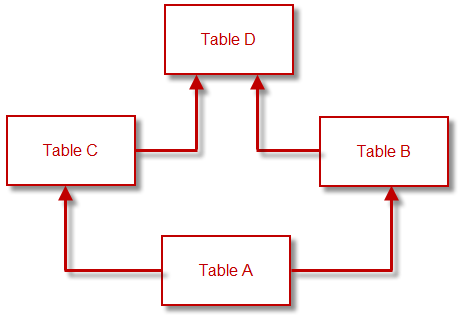
Join Weight: some applications, such as accounting systems, have large numbers of tables and complex relationships between them. As a result, there may be more than one "path" from one table to another, indirectly related, table. Consider the relationships shown below. There are two ways to get from Table A to Table D. However, if the preferred path is through Table B, you can tell Stonefield Query that by setting the join weight for the relationship between Table C and Table D to a higher value (the lower the value, the more important the join).
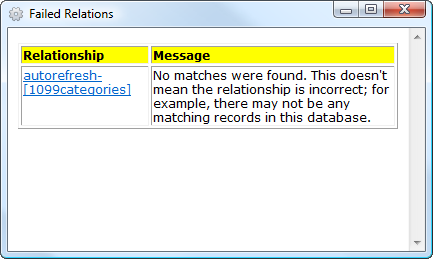
Test: this button tests the relationship by doing a SELECT child field or fields, parent field or fields FROM child table join type parent table (for example, SELECT Child.Field, Parent.Field FROM Child INNER JOIN Parent) and displays the first ten results in a grid. You can quickly see if there are any matches; if not, a dialog displays possible reasons why the relationship failed. Note that you'll get a warning message if one of the tables is a virtual table since that can't be tested.
If you are using the Ultimate version of Studio, you can also use the Test All Relations function in the File menu to test all relations in the data dictionary. Obviously, this can take a while to run if you have a lot of tables and relations, but it can save you a lot of time over testing each relationship one at a time. When you choose this function, it prompts you to enter the version number of relations to test; enter the version number to only test relationships with that version number or leave it blank to test all relations. After all of the relationships have been tested, Studio either informs you that all relations tested successfully or displays a dialog with information about which failed and why. You can click the link in the first column to jump to that particular relationship so you can adjust it if necessary and retest it.
Version: the relation's version number. A blank value means the relation is not versioned: it appears in Stonefield Query regardless of the version of the database. For a relation that isn't available in every version of the database, enter the version number followed by "+" to indicate the relation appears in that version and higher versions and should not be used in lower versions (that is, the relation was added in that version), "-" to indicate the relation appears in that version and lower versions and should not be used in higher versions (that is, the relation was removed in the next version), or no suffix to indicate the relation appears only in that version and should not be used in any other version. For example, "5.3+" indicates the relation is available starting in version 5.3 while "5.3-" indicates it was removed in version 5.4.
Use a comma-delimited list of values if the relation was added in one version and later removed. For example, "5.3+,5.5-" means it was added in version 5.3 and removed in version 5.6.
Multiple relations between the same pair of table are allowed if they have different version numbers.
© Stonefield Software Inc., 2025 • Updated: 02/05/20
Comment or report problem with topic