 Options.Settings
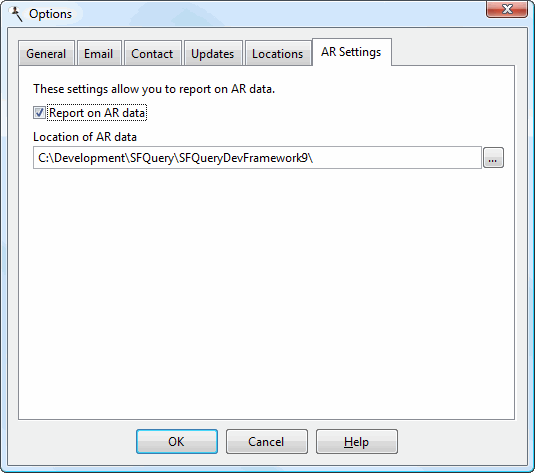
This script is used to specify additional options settings in the Options dialog (available from the Tools menu). With this script, you can add your own custom settings. Stonefield Query doesn't use these settings, but another of your scripts could, by calling either the GetRegistryValue or GetINIValue methods of the Application object (depending on where you decide to store the value) to retrieve the setting and then doing something with it. In the image below, the "Report on AR data" and "Location of AR data" options are custom settings.
You can validate the values the user enters in your custom settings by creating an Options.Validate script, and receive notification about changes when the user clicks the OK button by creating an Options.Changed script.
You may want to allow the user to assign values to these settings the first time they run Stonefield Query. In that case, use the same code you have in Options.Settings in a Setup.Settings script to have the custom settings appear in the Setup dialog as well. The best way to do that is to create a user-defined script with the necessary code and call that script from both Options.Settings and Setup.Settings.
The script code can access the Options dialog using the OptionsForm object. This allows you, for example, to programmatically remove a page from the Options dialog.
Parameters
A reference to the Stonefield Query Application object.
Return Value
An XML string defining the settings to display in the Options dialog. The format for the XML is as follows:
<settings>
      <setting>
        <page>Page to display setting on</page>
        <description>Setting description</description>
        <caption>Caption for control</caption>
        <type>Type of control</type>
        <key>Registry key</key>
        <left>Left position of the control</left>
        <top>Top position of the control</top>
        <default>Default value</default>
        <encryptkey>Key to use for encryption</encryptkey>
        <filetype>File type</filetype>
        <filedesc>File type description</filedesc>
        <script>Script name</script>
        <restart>Yes or No</restart>
        <storage>Data or Registry</storage>
      </setting>
      <setting>
        <page>Page to display setting on</page>
        <description>Setting description</description>
        <caption>Caption for control</caption>
        <type>Type of control</type>
        <key>Registry key</key>
        <left>Left position of the control</left>
        <top>Top position of the control</top>
        <default>Default value</default>
        <encryptkey>Key to use for encryption</encryptkey>
        <filetype>File type</filetype>
        <filedesc>File type description</filedesc>
        <script>Script name</script>
        <restart>Yes or No</restart>
        <storage>Data or Registry</storage>
      </setting>
      ...
</settings>
The following elements are available:
page: the page the setting should appear on. If not specified, the Data page is used. The choices are: "Data" for the Data page, "Locations" for the Locations page, or anything else to create a custom page with that name.
description: the description for the setting. This description appears at the top of the custom page to provide instructions to the user about what the setting is for. If several controls appear on the same page, only the description from the first setting is used. This description also appears for "file" and "directory" controls. This element is optional.
caption: the caption for the control (for example, "Location of AR data" in the image above).
type: the type of data entry control used for this setting. The choices are:
Checkbox: indicates the setting is a Yes/No value and a check box is used.
Textbox: indicates the setting is a string and a text box is used.
Password: indicates the setting is a string that should be stored as an encrypted value. A text box is used and characters entered by the user are displayed as "*".
Directory: use this value when the setting is a directory name; a text box with a button the user can click to display existing directories is used.
File: this value means the setting is a file name; a text box with a button the user can click to display file names is used.
Dropdown: indicates a drop-down control is used, filled with values returned from the user script specified in the "script" element. Note that the script specified must accept a parameter (a reference to SQApplication).
key: the Registry key under HKEY_CURRENT_USER\Software\CompanyName\ApplicationName\Options (where CompanyName and ApplicationName are the values of the Company Name and Application Name configuration settings) that holds the value for the setting. Alternatively, if you're storing values in Data.ini, this is the key value under the Options section.
left: the left position (in pixels, measured from the left edge of the dialog) of the control for this setting. Specify 0 or omit this element to place the control at the next available position.
top: the top position (in pixels, measured from the top edge of the dialog) of the control for this setting. Specify 0 or omit this element to place the control at the next available position.
default: the default value for the setting. This element is optional.
encryptkey: the key to use to encrypt the value if "Password" is specified for the type element. This element may be omitted (and is ignored if it's included) for other types.
filetype: the type of file to use, specified as "*." followed by the extension (for example, " *.ini"), if type is "File." This element may be omitted (and is ignored if it's included) for other types.
filedesc: the description for the file type, such as "INI Files (*.ini)", if type is "File." This element may be omitted (and is ignored if it's included) for other types.
script: the name of a script that returns XML specifying the options for a drop-down list, if type is "Dropdown;" this element may be omitted (and is ignored if it's included) for other types. The script must accept a parameter (a reference to the SQApplication object) and return an XML string with the following format:
<values> <value>first value to display</value> <value>second value to display</value> ... </values>restart: Yes indicates that Stonefield Query must restart if the user changes the value and clicks OK. This may be necessary if the value is used in a startup script and you want it to take effect immediately. Omit this element or specify No to not cause a restart.
storage: specify "Data" for the value to tell Stonefield Query to store this setting in Data.ini in the Data subdirectory of the Stonefield Query program folder (meaning it's global for all users). Omit this element or specify "Registry" to store the setting in the Windows Registry (meaning it's user-specific).
Example
Here's an example that adds two new settings to the Options dialog: a Yes/No setting indicating whether the user can report on AR data, and a directory setting indicating the location of the AR data. These settings appear on a page titled "AR Settings." If the user changes the location setting, Stonefield Query restarts.
 Visual FoxPro
lparameters toApplication as SQApplication
local lcXML
lcXML = '<settings>' + ;
  '<setting>' + ;
  '<page>AR Settings</page>' + ;
  '<description>These settings allow you to report on AR data.</description>' + ;
  '<caption>Report on AR data</caption>' + ;
  '<type>Checkbox</type>' + ;
  '<key>AR Data</key>' + ;
  '</setting>' + ;
  '<setting>' + ;
  '<page>AR Settings</page>' + ;
  '<caption>Location of AR data</caption>' + ;
  '<type>Directory</type>' + ;
  '<key>AR Location</key>' + ;
  '<restart>Yes</restart>' + ;
  '</setting>' + ;
  '</settings>'
return lcXML
 VBScript
function Main(Application)
Main = "<settings>" & _
  "<setting>" & _
  "<page>AR Settings</page>" & _
  "<description>These settings allow you to report on AR data.</description>" & _
  "<caption>Report on AR data</caption>" & _
  "<type>Checkbox</type>" & _
  "<key>AR Data</key>" & _
  "</setting>" & _
  "<setting>" & _
  "<page>AR Settings</page>" & _
  "<caption>Location of AR data</caption>" & _
  "<type>Directory</type>" & _
  "<key>AR Location</key>" & _
  "<restart>Yes</restart>" & _
  "</setting>" & _
  "</settings>"
end function
JavaScript
function Main(Application) {
var XML ;
XML = "<settings>" +
  "<setting>" +
  "<page>AR Settings</page>" +
  "<description>These settings allow you to report on AR data.</description>" +
  "<caption>Report on AR data</caption>" +
  "<type>Checkbox</type>" +
  "<key>AR Data</key>" +
  "</setting>" +
  "<setting>" +
  "<page>AR Settings</page>" +
  "<caption>Location of AR data</caption>" +
  "<type>Directory</type>" +
  "<key>AR Location</key>" +
  "<restart>Yes</restart>" +
  "</setting>" +
  "</settings>" ;
return cXML ;
}
 C#
C#
Please note that the method in this script must be named Options_Settings.
public static string Options_Settings(SFQApplication sfqApplication)
{
  StringBuilder XMLSettings = new StringBuilder("");
  XMLSettings.Append("<settings>");
  XMLSettings.Append("<setting>");
  XMLSettings.Append("<page>AR Settings</page>");
  XMLSettings.Append("<description>These settings allow you to report on AR " +
    "data.</description>");
  XMLSettings.Append("<caption>Report on AR data</caption>" );
  XMLSettings.Append("<type>Checkbox</type>");
  XMLSettings.Append("<key>AR Data</key>");
  XMLSettings.Append("</setting>");
  XMLSettings.Append("<setting>");
  XMLSettings.Append("<page>AR Settings</page>");
  XMLSettings.Append("<caption>Location of AR data</caption>");
  XMLSettings.Append("<type>Directory</type>");
  XMLSettings.Append("<key>AR Location</key>");
  XMLSettings.Append("<restart>Yes</restart>");
  XMLSettings.Append("</setting>");
  XMLSettings.Append("</settings>");
  return XMLSettings.ToString();
}
 VB.NET
Please note that the method in this script must be named Options_Settings.
public shared function Options_Settings(sfqApplication as SFQApplication) as string
  Dim XMLSettings As StringBuilder = new StringBuilder("")
  XMLSettings.Append("<settings>")
  XMLSettings.Append("<setting>")
  XMLSettings.Append("<page>AR Settings</page>")
  XMLSettings.Append("<description>These settings allow you to report on AR " +
    "data.</description>")
  XMLSettings.Append("<caption>Report on AR data</caption>" )
  XMLSettings.Append("<type>Checkbox</type>")
  XMLSettings.Append("<key>AR Data</key>")
  XMLSettings.Append("</setting>")
  XMLSettings.Append("<setting>")
  XMLSettings.Append("<page>AR Settings</page>")
  XMLSettings.Append("<caption>Location of AR data</caption>")
  XMLSettings.Append("<type>Directory</type>")
  XMLSettings.Append("<key>AR Location</key>")
  XMLSettings.Append("<restart>Yes</restart>")
  XMLSettings.Append("</setting>")
  XMLSettings.Append("</settings>")
  return XMLSettings.ToString()
End Function
See the topic for the GetRegistryValue method of the Application object for an example that uses these options.
Example
Here's an example that removes the General and Data pages from the Options dialog for Basic or Viewer users. pgfOptions is the name of the page frame control, SFPage1 is the name of the General page, and SFPage6 is the name of the Data page. Other pages are SFPage2 (Email), SFPage3 (Contact), SFPage5 (Locations), and SFPage4 (Updates).
Visual FoxPro
lparameters toApplication as SQApplication
if inlist(toApplication.License, 1, 3)	&& Basic or Viewer
  OptionsForm.pgfOptions.RemoveObject('SFPage1')
  OptionsForm.pgfOptions.RemoveObject('SFPage6')
endif
See also
Options.Changed | Options.Validate | Scripts | Setup.Settings© Stonefield Software Inc., 2025 • Updated: 10/02/20
Comment or report problem with topic