 Pointer Editor
The Pointer Editor dialog has the following options:
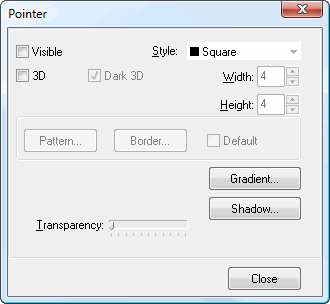
Visible: turn this setting on to display the pointer from the point label to the point.
Style: select the desired pointer style from the drop-down list.
3D: turn this setting on to display the pointer as 3-dimensional.
Dark 3D: turning this setting on displays the sides of the pointer in a darker shade of the pointer color, giving a shadowed appearance. Turning it off display the sides in the same color as the front.
Width: use this setting to specify the width of the pointer.
Height: use this setting to specify the height of the pointer.
Pattern: click this button to display the Pattern Color Editor dialog.
Border: click this button to display the Border Editor dialog.
Default: turn this setting on to use the default properties for the pointer.
Gradient: click this button to display the Gradient Editor dialog.
Shadow: click this button to display the Shadow Editor dialog.
Transparency: this controls the transparency of the pointer.
© Stonefield Software Inc., 2023 • Updated: 06/07/16
Comment or report problem with topic