 Numeric Format Editor
The Numeric Format Editor dialog has the following options:
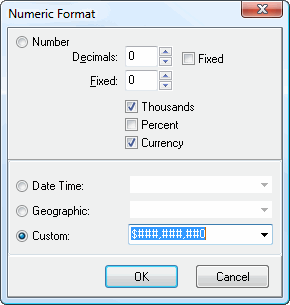
Number: select this item to format values as numbers.
Decimals: this specifies the number of decimal places to display.
Fixed: turn this setting on to always display the number of decimals indicated; turn it off to not display trailing zeros.
Thousands: turn this setting on to display the thousands separator.
Percent: turn this setting on to display the percent sign (%).
Currency: turn this setting on to display the currency symbol.
Date Time: turn this setting on to format values as date and time values. You can select the desired format from the drop-down list beside this setting.
Geographic: turn this setting on to format values as latitude and longitude values. You can select the desired format from the drop-down list beside this setting.
Custom: if you want to use a custom format, type the format into this setting. Use "#" as a digit placeholder, "," as a placeholder for the thousands separator, "." as a placeholder for the decimals separator, and "0" to display a zero in that place.
© Stonefield Software Inc., 2023 • Updated: 06/07/16
Comment or report problem with topic