 Pattern Color Editor
The Pattern Color Editor dialog displays when you click a button labeled Pattern. It has the following options:
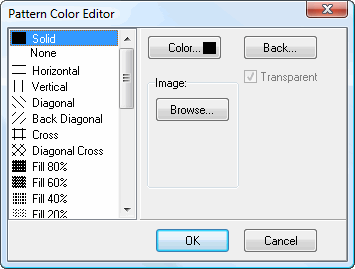
Pattern: select the desired fill pattern for each bar. The default is a solid color, but you can also select from various cross-hatch and other patterns.
Color: click this button to display a dialog in which you can select the pattern color.
Back: click this button to display a dialog in which you can select the background color for the pattern.
Transparent: turn this on to make the background transparent. This option is only available if you selected a background color, and turning it on turns off the background color.
Image: if you want to use a custom image, click the Browse button and select the desired image file.
© Stonefield Software Inc., 2023 • Updated: 06/07/16
Comment or report problem with topic