 Step 2: Data Selection (Label Report)
Step 2 allows you to select which fields appear in the report. Each field you select will appear on its own line in the label. Note that if you've turned on Advanced layout in Step 5, the options in this step are disabled (with the exception of the Advanced button) and a message appears indicating why this is the case.
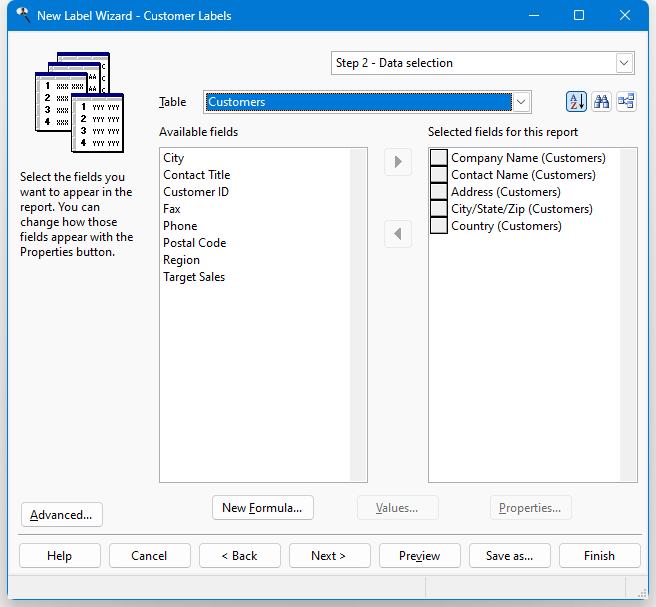
The options in this step are:
Table: a drop-down list that displays the names of the tables you can select fields from.
 : Stonefield Query by default displays fields in alphabetical order. This makes it easy to find a field in the list. However, sometimes it makes more sense to display fields in the order they appear in the table. For example, for typical address fields, you would see this order alphabetically:
Address
City
Contact Name
Country
Customer Name
Postal Code
Regionwhereas they'd appear like this in table order:
Customer Name
Contact Name
Address
City
Region
Postal Code
CountryClick this button to display fields in table order. Click it again to display them alphabetically. The setting of this button is remembered, so if you edit a report later, it has the same setting.
 : a long list of tables can make it difficult to find the ones you're interested in. Once you've selected fields from one table, chances are you're next going to select fields from a directly-related table. For example, if you chose a field from Customers, you are more likely to choose a field from Orders than from Products. Click this button to reduce the list of tables to only those directly related to ones you've already selected fields from. Click it again to restore the list to all tables.
Available fields: a list containing all reportable fields from the table shown in the Table list that have not already been selected.
Selected fields for this report: a list showing the fields to be included in the report, with the table the field is from shown in parentheses. Fields in this list may be moved up and down to change the order in which the columns are printed on the report; to do this, click the button in front of the field to move and drag the button up or down in the list.
Add: clicking this button adds the selected field in the Available list to the Selected list. You can select several fields by holding down the Ctrl key as you select them; clicking Add adds all selected fields to the Selected list. You can also add the field by double-clicking it in the Available list, selecting it and pressing Enter, or dragging the field from the Available list to the Selected list. The field is removed from the Available list.
If you select a field from a table that is not related in any way to the other tables involved in the report, you are asked if you want to create a relationship between the tables.
Remove: clicking this button removes the selected field (or fields if you have selected more than one) from the Selected list. You can also remove the field by dragging it from the Selected list to the Available list. The field is added to the Available list (although you may not see it if the table the field is from is not the selected table).
Advanced: click this button to customize how the report runs.
New Formula: click this button to define a new formula. The new formula is automatically added to the report.
Edit Formula: click this button, which appears instead of New Formula when you have selected an existing formula, to edit the formula.
Values: displays a list of the unique values in the field selected in either the Available or Selected list, depending on which one was selected last. This is handy if you're not sure what data a field contains.
Properties: clicking this button displays the Properties dialog. You can also display this dialog by double-clicking the field in the Selected list or selecting it and pressing Enter. This dialog allows you to specify how the field looks, how grouping is performed, and whether summary totals are shown or not.
Hover the mouse pointer over a field in the available list to display a comment about the field (if there is one). Hover the mouse pointer over a field in the selected list to display what settings for the field have been changed from their defaults (if any).
© Stonefield Software Inc., 2023 • Updated: 11/23/23
Comment or report problem with topic